
A property record organised around the decision
Property Intelligence turns a selected asset and its linked warehouse evidence into a readable workspace with one home for each fact, a clear executive synopsis, and direct routes into provenance, analysis, monitoring, and reporting.

A property record that shows the reading and its limitations
The Property Workspace is the canonical record for identity, ownership, occupation, financials, market and valuation, planning and risk, events and relationships, decision evidence, and sources.
Representative interface using demonstration data. The image demonstrates product structure, not a public assertion about a live asset.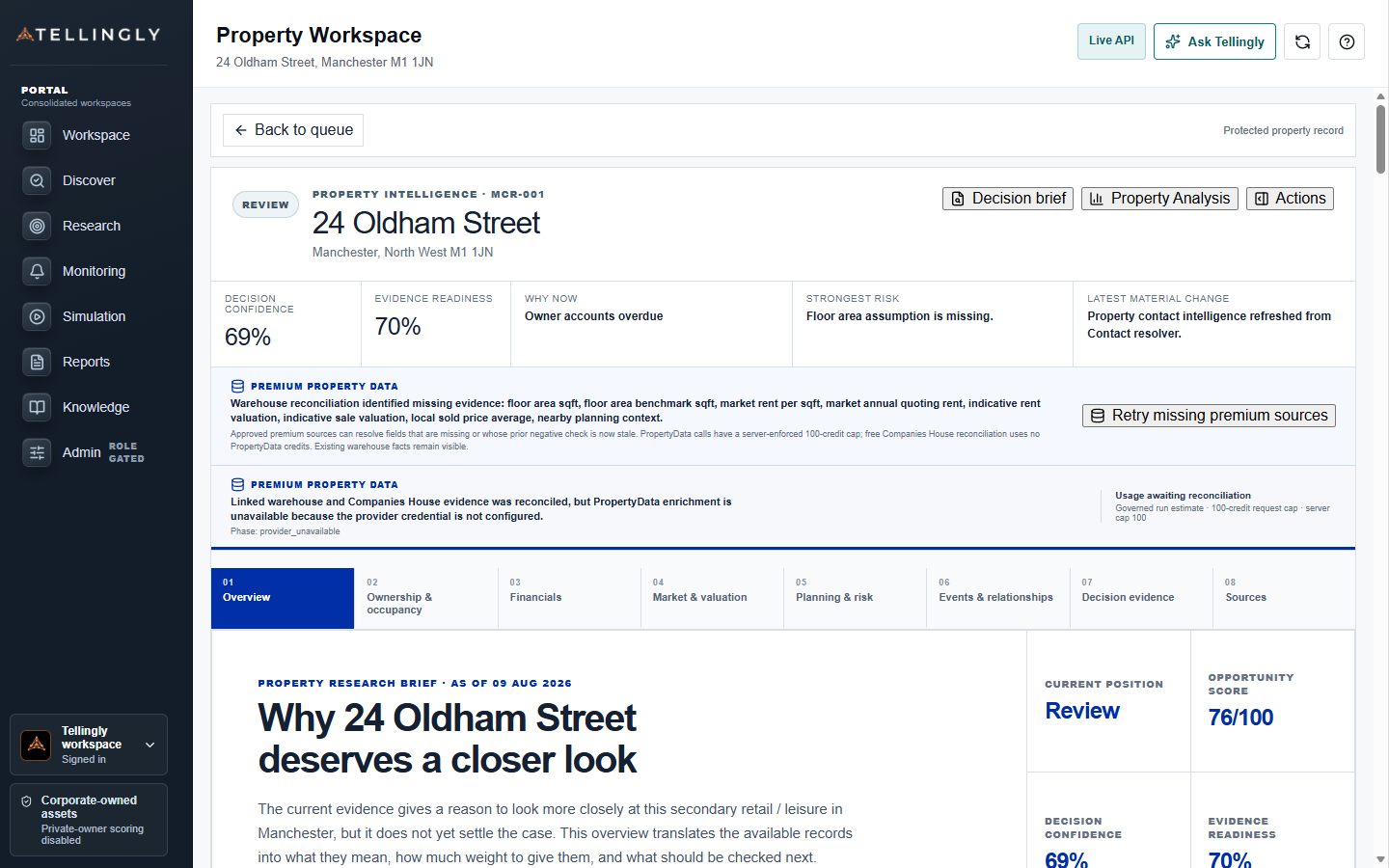
Review the selected property without separating facts from provenance
The header keeps the current reading, confidence, evidence readiness, why-now catalyst, strongest risk, latest material change, enrichment state, and actions visible. Section navigation provides a detailed home for each fact while sources and unresolved verification needs remain available to the reviewer.
- Canonical identity and current analytical reading
- Separate ownership, financial, market, planning, event, and evidence sections
- Visible source enrichment, confidence, and critical gaps
- Primary question
- What is known about this property now?
- Information design
- One detailed home for every canonical fact
- Decision output
- Synopsis, evidence position, risks, and next actions
Start with a readable property synopsis
The Overview is intended to orient a decision maker before they inspect the detailed record. It explains what the asset appears to be, why it came into view, how confidently the identity is anchored, what the strongest commercial or risk signals are, and which questions remain open.
Technical facts remain available, but they are accompanied by connected prose that explains their analytical meaning. The synopsis distinguishes the current posture from the evidence coverage: confidence describes support for a conclusion, while coverage describes how much required evidence is confirmed and current.
Identity, title, ownership, and occupation
The identity layer brings together the address, UPRN, title number, property identifiers, and match basis. Ownership and occupation are then analysed separately. A registered owner, legal occupier, trading name, property operator, and company registered at the address can all be different parties.
Confirmed records appear as facts. Candidate owner or occupier matches remain visibly candidate-grade until the property-to-entity relationship is verified. The workspace shows the candidate value, the evidence that produced it, match confidence, and the action needed to confirm or reject it.
Financial, market, and valuation context
The financial and market sections bring together eligible owner or occupier accounts, rent and rating evidence, floor area, observed transactions, local sold-price distributions, comparables, valuation inputs, and market indicators. Direct property values are kept separate from local benchmarks and modelled indications.
Where a direct value is unavailable, the workspace can still explain the relevant benchmark—its geography, period, sample size, source, and limitations. It should never present a neighbourhood transaction as if it were the selected property's sale or turn a generic market statistic into a formal valuation.
- Observed financial or property measures retain their source and date.
- Benchmarks state the area and population they describe.
- Derived measures explain their inputs and revision.
- Unverified or missing inputs remain decision gates.
Planning, physical condition, and risk
Planning applications, use-class evidence, EPC and MEES context, environmental constraints, access, physical characteristics, and alternative-use considerations are grouped around the questions they affect. Dated events are shown chronologically and nearby applications are distinguished from applications linked to the subject.
The section explains the potential decision impact without treating planning history as consent or physical context as a survey. Where property-specific evidence is absent, the user sees the contextual evidence that is available and the exact verification required before relying on it.
Events, relationships, and decision evidence
Events connect changes over time to the property, owner, occupier, or wider context. Relationships show how the selected asset is connected to companies, people, sectors, places, scores, and source observations. Each path explains what the relationship means and how confident the linkage is.
Decision Evidence provides the conclusion, decisive support, counterevidence, unresolved gaps, timeline, and reliance limits. Detailed table, graph, and timeline views share the same canonical evidence rather than repeating it in several formats.
Sources, actions, and continuity
The Sources area provides property-linked drill-through into confirmed, candidate, contextual, stale, historical, and excluded records. Users can see source-family coverage, row dates, match method, scope, freshness, and whether a record influenced the current decision.
From the property header, an analyst can open advanced analysis, monitor the asset, file the reviewed revision, or create a report. Each action carries the selected property and evidence revision forward so the next workspace does not reconstruct a different picture.